Quickstart
Xenopict is a python library for depicting molecules.
Installation
Xenopict installs from pypi.
pip install xenopict
The package is only tested on Python 3.10 and 3.9. It may run on earlier versions of python, but we do not intend to maintain compatibility.
Reading in a Molecule
The main entrypoint to xenopict is the Xenopict class, which is initialized with a small molecule. The class can take a SMILES String
from xenopict import Xenopict
mol = Xenopict('O=C(O)Cc1ccccc1Nc1c(Cl)cccc1Cl')
It can also be initialized with a RDKit mol.
from rdkit import Chem
mol = Chem.MolFromSmiles('O=C(O)Cc1ccccc1Nc1c(Cl)cccc1Cl')
diclofenac = mol = Xenopict(mol)
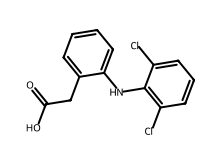
Now that a molecule is loaded, we can display it easily in a notebook.
from xenopict import magic # the magic package enables several integrations with notebooks
mol
Atom and Bond Shading
Xenopict can shade molecules by with an intensity, which can range from 0 to 1 for sequential colormaps, and -1 to 1 for diverging colormaps. This shading is implemented in concise vector graphics. Xenosite produces an SVG, which can be accessed with the ‘to_svg’ method.
To demonstrate, we will shade a molecule by its absolute partial charge [0 to 1], which we compute from the RDKit library. Each atom is assigned a number in a vector.
import rdkit.Chem.rdPartialCharges
import numpy as np
rdkit.Chem.rdPartialCharges.ComputeGasteigerCharges(mol.mol)
shading = np.array([a.GetDoubleProp("_GasteigerCharge")  for a in mol.GetAtoms()])
shading = abs(shading / abs(shading).max() ) # partial charge (scaled to [0, 1])
shading
array([0.52409679, 0.63909631, 1.        , 0.15070901, 0.0277732 ,
       0.11722158, 0.12854194, 0.12512175, 0.07965959, 0.08793757,
       0.73360109, 0.15852838, 0.13636156, 0.17049353, 0.08585118,
       0.12297688, 0.08585118, 0.13636156, 0.17049353])
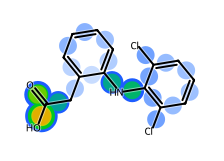
The shading is applied to molecule using the “shade” method. The “halo” method adds a halo effect that aids visibility.
Xenopict(mol).shade(shading).halo()

We can shade molecules by bond too. To demonstrate, we will create a shading vector for bonds that is the average absolute charge of the atom at each end.
a1 = [b.GetBeginAtomIdx() for b in mol.GetBonds()]
a2 = [b.GetEndAtomIdx() for b in mol.GetBonds()]
bshading = (shading[a1] + shading[a2])  / 2
bshading
array([0.58159655, 0.81954816, 0.39490266, 0.08924111, 0.07249739,
       0.12288176, 0.12683184, 0.10239067, 0.08379858, 0.41076933,
       0.44606474, 0.14744497, 0.15342754, 0.11110637, 0.10441403,
       0.10441403, 0.11110637, 0.15342754, 0.05785539, 0.14744497])
Xenopict(mol).shade(bond_shading=(a1, a2, bshading)).halo()
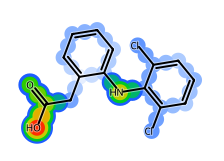
Atoms and bonds can be shaded together at the same time.
x = Xenopict(mol).shade(shading, bond_shading=(a1, a2, bshading)).halo()
x
Marking, Shading and Focusing Substructures
At times we want to mark a substructure. We can do so by supplying a list of atom idxs.
x.mark_substructure([0,1,2,3])
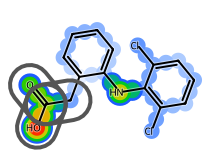
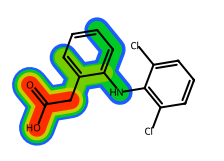
We can also shade substructures, by specifying them as lists of IDs, wiht a list of shading values. Substructures with intensities closer to zero are painted behind those with higher intensities.
substr1 = [0,1,2,3]
substr2 = [7,8,9,10]
substr3 = [3,4,5,9]

shading = [1.0, 0.5, 0.6]

Xenopict(mol).shade_substructure([substr1, substr2, substr3], shading)
By default, xenopict adds in all the bonds joining a group of atoms. But sometimes this includes bonds that were not wanted. Substructures can be more precisely specified by including a list of bonds.
mol = Chem.MolFromSmiles("c1ccccc1CCC")

atoms = [0,1,2,3,4,5]
bonds = [[0,1], [2,1], [2,3], [3,4],[4, 5], [5,6]]

Xenopict(mol).shade_substructure([atoms], [1.0]), \
Xenopict(mol).shade_substructure([atoms], [1.0], [bonds])
Alongside shadings or alternately to them, we can also depict a substructure in isolation.
Xenopict(mol).substructure_focus(atoms), \
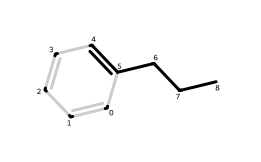
Xenopict(mol).substructure_focus(atoms, bonds)
Adding Atom Indices
Molecules can be drawn with indices too.
x = Xenopict(mol,scale=30,  add_atom_indices=True)
x
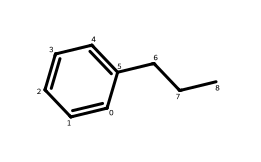
Atom IDs are carried over to substructure depictions, but they are not filtered out yet.
x.substructure_focus([4,5,6])